# Combine run problem
**URL:** https://forum.cmascenter.org/t/combine-run-problem/4491
**Category:** CMAQ-POST
**Created:** [October 18, 2023, 8:23am UTC](https://forum.cmascenter.org/t/combine-run-problem/4491 "2023-10-18T08:23:10Z")
**Posts on this page:** 6
**Page:** 1
### Author:  [@nek](https://forum.cmascenter.org/u/nek)
#### Post date: [October 18, 2023, 8:23am UTC](https://forum.cmascenter.org/t/combine-run-problem/4491/1 "2023-10-18T08:23:10Z")
Hello there,
I am generally a new user to cmaq and at this step I am using combine script for a nested domain. After making changes as shown to other posts regarding xcell - ycell (realaxing tolerance for consistency checks) I eventually managed to run the script. The run is somehow endless without creating the COMBINE\_DEP file. It only creates the COMBINE\_ACONC. When processes the last hour, the terminal shows API Shutdown and immediately starts running again. Also, the file size does not change at some point, even if it is rerunning. The Benchmark case runs fine. I did not see any log files either. Am I doing something wrong?
Thank you in advance,
nek
---
### Author:  [@hogrefe.christian](https://forum.cmascenter.org/u/hogrefe.christian)
#### Post date: [October 18, 2023, 11:01am UTC](https://forum.cmascenter.org/t/combine-run-problem/4491/2 "2023-10-18T11:01:36Z")
Hello nek,
to help us troubleshoot the issue you are encountering, please post the following files:
- your run script
- the screen output generated when invoking that run script (since you say no log file is being generated)
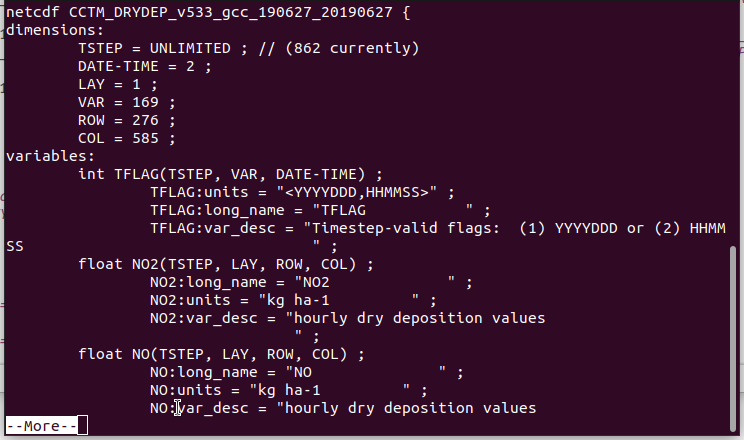
- the headers (generated by ncdump -h) of the input files referenced by the run script and of the COMBINE\_ACONC file generated by `combine`
---
### Author:  [@nek](https://forum.cmascenter.org/u/nek)
#### Post date: [October 18, 2023, 2:11pm UTC](https://forum.cmascenter.org/t/combine-run-problem/4491/3 "2023-10-18T14:11:42Z")
Thank you very much for your quick reply! I hope I uploaded all the files you asked. On the meantime, I tried the other post scripts (calc metric and h2day) using the combine\_aconc file and it did not occur some kind of error. So that means it runs fine but it is unable to stop? I am still a little lost.
Thank you again




[run\_combine\_nest.csh](https://forum.cmascenter.org/uploads/short-url/e0b6eg6c9yYHsvDdjCk4RvOEHUX.csh) (7.4 KB)
---
### Author:  [@hogrefe.christian](https://forum.cmascenter.org/u/hogrefe.christian)
#### Post date: [October 18, 2023, 10:03pm UTC](https://forum.cmascenter.org/t/combine-run-problem/4491/4 "2023-10-18T22:03:06Z")
Thanks for posting this information.
The structure of your CCTM\_ACONC, CCTM\_APMDIAG, CCTM\_WETDEP, METCRO3D, etc. files which you are providing to `combine` is unusual - they are named as if they contained information for a single day only, but in fact they seem to contain hourly data for the entire June 27 - August 1 time period you are trying to process. Therefore, the script should be invoking `combine` only once, but instead it is still looping over each single day between June 27 and August 1. Each iteration of that loop will repeat the processing of these input files with their 862 hours again, and just write out the results for these hours to the same output file, overwriting the previous output. It is important to remember that `combine` will always process the longest common time record found across all input files, unless you uncomment the `!#start` and `!#end` lines at the beginning of the SpecDef file
If you did not stop the script, after executing this loop 36 times (once for each each between June 27 and August 1) for the COMBINE\_ACONC portion of the script, the script would have proceeded to the COMBINE\_DEP portion and again execute 36 daily loops, which in your case would take a long time and just redo everything over and over again after the first loop.
Given the structure of the files you are providing to `combine`, the solution is to execute the COMBINE\_ACONC and COMBINE\_DEP loops only one time each, since all your input files already cover the entire time period you are interested in. You can accomplish this by changing the script variable END\_DATE to the same value as the script variable START\_DATE, i.e. “2019-06-27”, or by just eliminating the loops altogether since they are not needed in your case.
---
### Author:  [@nek](https://forum.cmascenter.org/u/nek)
#### Post date: [October 19, 2023, 7:58am UTC](https://forum.cmascenter.org/t/combine-run-problem/4491/5 "2023-10-19T07:58:20Z")
Mr hogrefe,
your reply is very helpful! It happened exactly as you said, it continued to overwrite the same file over and over until I stopped it. The truth is I could not imagine it needed 36 loops for each to execute, but now that you pointed out it makes a little sense. I followed your last advice and by setting the same START and END DATE it worked! Thank you again for you time!
The fact about the unusual structure of the files makes me wonder. Could it be because of the emission or wrf files? Before even running mcip I combined (ncrcat) them in a single file for the total time period. Also, I had followed the same procedure simulating the coarse domain the previous semester without this “problem”. The only difference is now I run it in a server, but this should not be an issue I guess. Furthermore, could it be something wrong with the cctm output files, as they say LAY=1, because I had read on some other post in the forum that cctm should not be a single layer file?
---
### Author:  [@hogrefe.christian](https://forum.cmascenter.org/u/hogrefe.christian)
#### Post date: [October 19, 2023, 11:40am UTC](https://forum.cmascenter.org/t/combine-run-problem/4491/6 "2023-10-19T11:40:20Z")
I’m glad this solved your `combine` problem.
No, there is nothing wrong with preparing input files that span the entire time period you want to simulate and then changing “NSTEPS = 240000” to a longer period in the CCTM run script so that your CCTM output files also cover longer time periods. It’s just more typical for users to keep “NSTEPS = 240000” so that each output file covers a single day, but it’s not a requirement. The loop and file naming convention used in the `combine` run script was written with that more typical setup in mind, so the change from the typical setup in your CCTM run script then required some corresponding changes in the `combine` run script to avoid the needless looping.
The number of desired layers in your CCTM output files depends on what you intend to do with these files. It is controlled by the CONC\_BLEV\_ELEV, ACONC\_BLEV\_ELEV,and APMDIAG\_BLEV\_ELEV environment variables in your CCTM version 5.3 run script. If you want to generate boundary conditions from your simulation for a nested domain, you would need output for all layers. If you only want to analyze surface level model output without investigating vertical distributions, restricting model output to layer 1 may be sufficient. There is no generalizable right or wrong setting, which is why the environment variables listed above give that control to the user to customize the model output to fit their particular needs.